Details
Structure
Worker
does only the specific task
Manager
configures the amount of result output
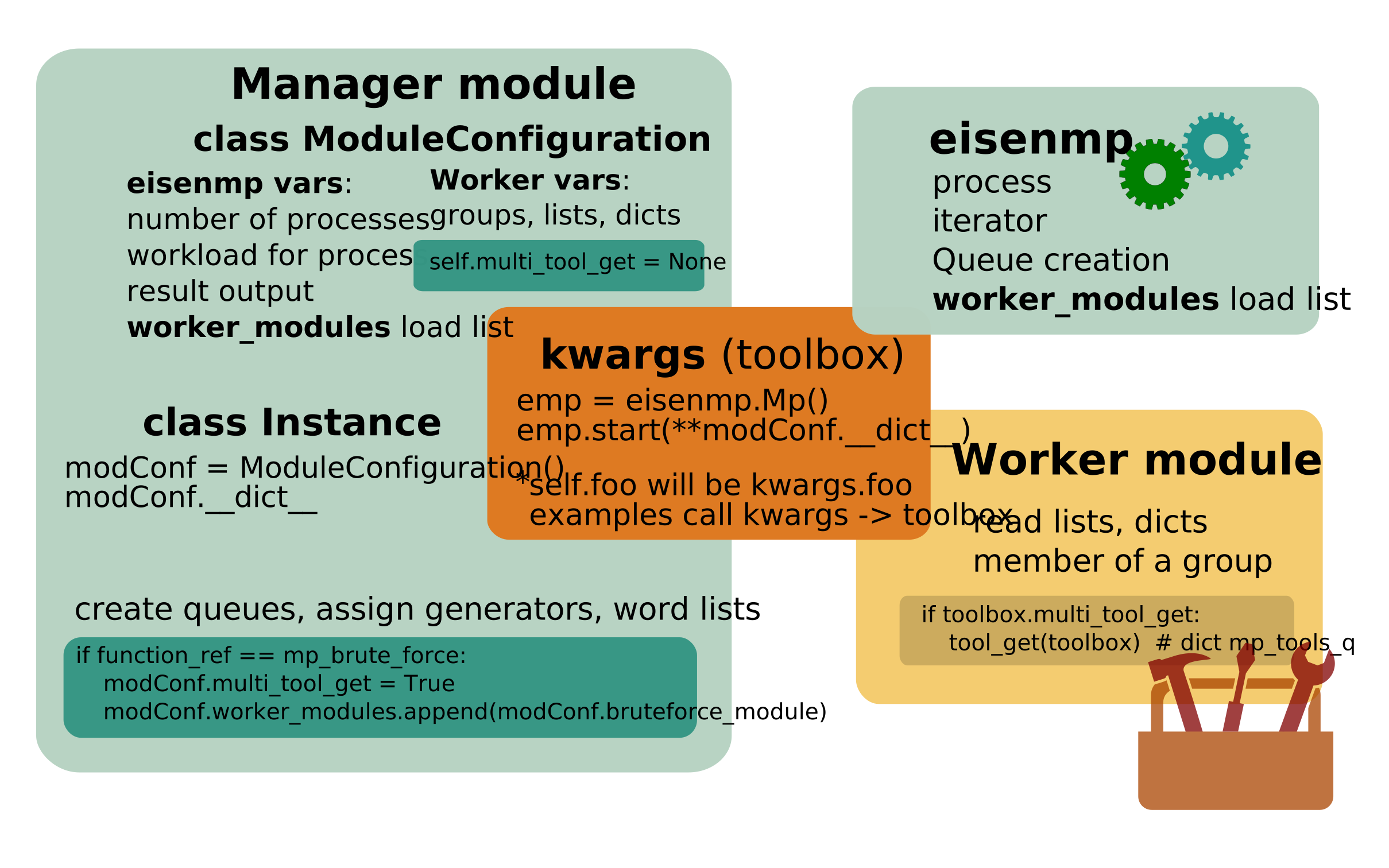
assign groups, lists, queues
configures the performance with CPU count and workload
Variables transfer to worker
The worker should be more flexible. Thus, it needs more structured information.
Information collector is the
ModuleConfigurationclass instance. The class can carry any name.All instance attributes are stored in a dictionary __dict__. (self.foo will be kwargs.foo)
The instance dictionary is argument (kwargs) to call the eisenmp start method.
Kwargs is updated further with queue information and the START_SEQUENCE_NUM of the process, before process start.
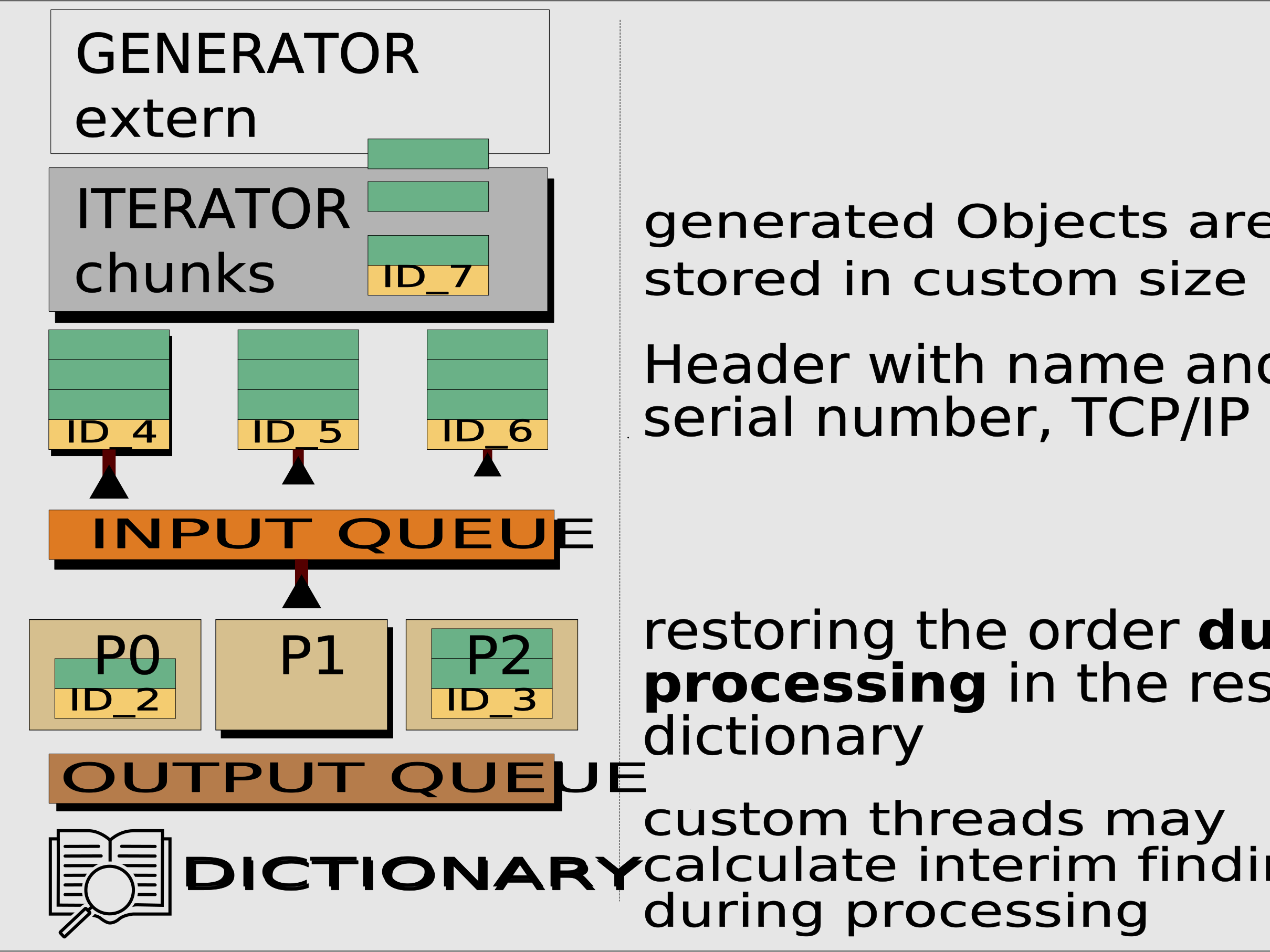
Generator - iterator chunks on every CPU core
output 1, 2, 3, 4, 5 ➜ eisenmp iterator list [ [1,2] [3,4] [5] ] ➜ ROWS_MAX chunks for your Worker
Mngr(): Import and instantiate eisenmp. Register the worker in (also) a list.
Mngr(): Assign Worker load and process count.
Mngr(): Call iterator run_q_feeder(generator=Mngr generator)
Wkr(): Loop over ROWS_MAX list chunks. Return False to auto exit worker and process, or get next chunk
def worker_entrance(toolbox):
    """
    - WORKER - Called in a loop.
    """
    audio_chunk_lst, video_chunk_lst = None, None
    audio_chunk_lst, video_chunk_lst = None, None
    if not toolbox.WORKER_ID % 2:  # mod is 1 odd (see also constant START_SEQUENCE_NUM)
        audio_chunk_lst = batch_1_audio_get(toolbox)
        video_chunk_lst = batch_1_video_get(toolbox)
    if toolbox.WORKER_ID % 2:  # mod is 0 even
        audio_chunk_lst = batch_7_audio_get(toolbox)
        video_chunk_lst = batch_7_video_get(toolbox)
    print(f'....{toolbox.WORKER_ID} {audio_chunk_lst} {video_chunk_lst}')

    # loader_module calls worker function endless until False
    busy = template_worker(toolbox, audio_chunk_lst, video_chunk_lst)
    if not busy:
        return False
    return True
Examples gitHub repository, or get the PyPi package
One Server (or more) on every CPU core
Mngr(): Import and instantiate eisenmp. Register the worker module in a list.
(D.1) Wkr(): The worker starts ONE server, blocks (run_forever on IP: foo port: 42) and serves whatever
(D.2) Wkr(): The worker starts MANY server. Server start call must be threaded
Server read queues: Follow the Generator todo
# Flask, module_loader calls module multiple times, can also be a for loop
app_factory = create_app(port)  # flask, we feed port number to update the HTML page link
# app_factory.run(host="localhost", port=port)  # THIS BLOCKS

threading.Thread(
    target=lambda: app_factory.run(host="localhost", port=port)
).start()
Examples gitHub repository, or get the PyPi package
Port groups
Map START_SEQUENCE_NUM ➜ to server ports on CPU cores ➜ to an IP address

# port group - example from worker/eisenmp_exa_wrk_multi_srv_each_cpu.py
proc_start_num = toolbox.kwargs['START_SEQUENCE_NUM']

port, col = 0, None
if proc_start_num in toolbox.blue_lst:
    col = color_dict['BLUE']
    port = blue_q_get(toolbox)[1]  # [0] is header row
if proc_start_num in toolbox.yellow_lst:
    col = color_dict['YELLOW']
    port = yellow_q_get(toolbox)[1]
START_SEQUENCE_NUM always starts with zero, up to max process count.Examples gitHub repository, or get the PyPi package
serial number header
run_q_feeder() iterator lists get a serial number header to recreate the original order of chunks
emp = eisenmp.Mp()
emp.start(**modConf.__dict__)  # instance attributes available for worker and feeder loop
generator = number_generator()
# here default mp_input_q, use if only one q is needed, serial number header in first list row
emp.run_q_feeder(generator=generator, input_q=emp.mp_input_q)

# resul_dict['mp_input_q (default)'] output, 'mp_input_q (default)' is INPUT_HEADER

"{'mp_input_q (default)': [('_TID_0', 4572292.910843126), ('_TID_1', 6965972.299514242),
('_TID_2', 7035727.755562525), ('_TID_3', 6058578.161866343), ('_TID_4', 5745295.626845666),
('_TID_5', 4294093.036350164), ('_TID_6', 5896344.680703023), ('_TID_7', 5236117.507712274),
('_TID_8', 3705417.711853838), ('_TID_9', 3594605.6919411113), ('_TID_10', 4705313.774816647),
('_TID_11', 5000706.459564939), ('_TID_12', 5513912.998950592), ('_TID_13', 4410874.434293335)]}"
You can validate the result ticket id numbers if generator count is known.
Note
generator_items / ROWS_MAX (workload_items per CPU) = number of Ticket ID’s
Results
Output can be stored if RESULTS_STORE is set in config